
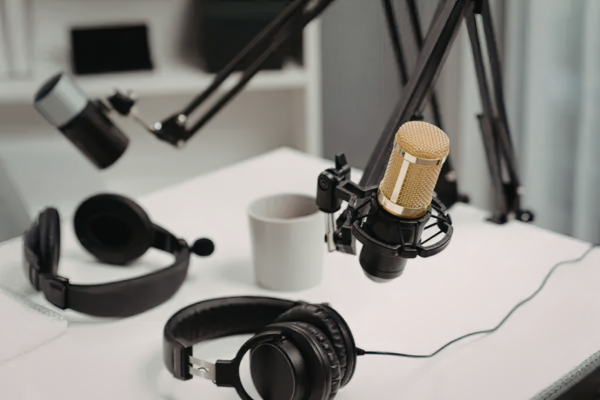
A professional home studio is no longer optional for voice actors in the USA. Clients now expect clean audio, fast delivery, and broadcast-ready quality. If you work in commercials, radio, TV promo, eLearning, narration, political ads, animation, video games, audiobooks, or virtual announcing, your studio needs to sound professional.
This checklist will help you build a home studio that sounds polished without wasting money. It is written for voice actors who want practical results, better sound, and a reliable workflow. It also aligns with the kind of clean, confident, and client-ready standard that Mod Voiceover represents.
Why a Home Studio Matters
A strong voice is important, but poor room sound can weaken even the best performance. Echo, background noise, and bad mic placement can make your audio sound unprofessional. That can hurt auditions, client trust, and repeat work.
A good home studio gives you consistency. You can record with the same quality every time. That matters because clients want dependable sound, not just a good performance once in a while.
For a brand like Mod Voiceover, consistency is part of the identity. Commercial clients, production teams, and brand managers want voice talent who sound polished, reliable, and ready to deliver.
Start With the Right Room
The best home studio starts with the room, not the gear. Choose the quietest room in your home. A spare bedroom, closet, basement, or small office often works well.
Avoid rooms near traffic, HVAC systems, kitchens, or laundry machines. These sounds can show up in recordings and reduce quality. Voiceover work needs a quiet space with as little interference as possible.
Room shape also matters. Smaller rooms often sound better than large empty spaces. Soft furnishings like rugs, curtains, and couches can help reduce reflections.
Acoustic Treatment Comes First
Many beginners buy expensive microphones before fixing the room. That is a mistake. In most home studios, acoustic treatment matters more than high-end gear.
Acoustic treatment reduces reflections inside the room. It does not block outside noise completely. That is soundproofing, and it is more expensive and harder to do.
Start with basic treatment. Use acoustic panels, thick curtains, rugs, moving blankets, or a portable vocal booth. Focus on the first reflection points. These are the spots where sound bounces back toward the microphone.
A dry, controlled room will improve almost any mic. That is one of the fastest ways to get a more professional voiceover sound.
Core Equipment Checklist
Here is the basic equipment every professional home voiceover studio should have:
- Microphone.
- Audio interface.
- Computer or laptop.
- Recording software.
- Closed-back headphones.
- Pop filter.
- Mic stand or boom arm.
- XLR cable.
- Shock mount.
Each item plays a key role. The microphone captures your voice. The interface converts the sound into digital audio. The headphones help you monitor your recording. The pop filter reduces plosives, and the shock mount helps control vibration.
You do not need the most expensive gear to sound professional. You need the right gear, set up correctly.
Choosing the Right Microphone
The microphone is one of the most important parts of your setup. For voiceover, many talent prefer large-diaphragm condenser microphones because they capture detail and clarity.
That said, the best microphone depends on your voice and your room. If your space is quiet and treated well, a condenser mic can sound excellent. If your room has more noise, a dynamic mic may be a better choice.
Test different microphones if you can. Listen for brightness, warmth, and how the mic handles your natural tone. A microphone should support your voice, not fight it.
Mic placement also matters. A common starting point is six to eight inches from your mouth. Use a pop filter and keep your position consistent.
Set Up the Mic Correctly
Mic placement is just as important as mic choice. Even a great microphone can sound weak if it is placed badly.
Keep the mic slightly off-axis from your mouth. This helps reduce harsh plosive sounds like “p” and “b.” It can also reduce sibilance.
Use a boom arm or a solid stand to keep the microphone stable. A shock mount helps reduce vibration from the desk or floor. Avoid placing the mic near reflective surfaces whenever possible.
Your posture matters too. Sit or stand in a position that feels natural. Do not keep moving closer and farther away during the read. Consistency creates a more polished sound.
Acoustic Treatment Basics
A controlled room helps your voice sound clean and direct. The goal is to reduce echo and room reflections. You want the microphone to capture your voice, not the room.
Start with the first reflection points. These are the places where sound bounces and returns to the mic. Acoustic panels are useful here. Thick blankets, curtains, and rugs can also help.
If you are on a budget, start simple. A closet with clothes, a small room with soft surfaces, or a portable booth can work well. The goal is not perfection. The goal is a clean, usable recording space.
For a brand like Mod Voiceover, this kind of clean sound is especially important. Commercials, narration, and promo work all benefit from a dry, focused recording.
Software and Workflow
Your recording software should be simple and reliable. It should let you record, edit, and export files without slowing you down. Voice actors need a workflow that is fast and easy to repeat.
Learn the basics of your software well. Know how to set input levels, cut mistakes, and export the right file format. These small skills save time and prevent errors.
Keep your files organized. Use clear names for sessions, takes, and final files. Back up your work to an external drive or cloud storage. A clean workflow makes you look more professional and helps you deliver faster.
Budget-Based Setup
Not every voice actor starts with the same budget. That is fine. You can build a good studio in stages.
Starter setup
A basic setup is a great place to begin:
- Entry-level microphone.
- Basic audio interface.
- Closed-back headphones.
- Pop filter.
- Mic stand.
- Light acoustic treatment.
Mid-range setup
This works well for growing freelancers:
- Better microphone.
- Reliable interface.
- Stronger room treatment.
- Shock mount.
- Boom arm.
- Better monitoring headphones.
Pro setup
For working professionals:
- Broadcast-quality microphone.
- High-end interface.
- Fully treated room.
- Backup cables and mic.
- Fast editing workflow.
- Better isolation solutions.
The smart approach is to fix the room first, then improve the gear over time. That is usually the best long-term investment.
What Clients Expect in 2026
Clients today expect more than a nice voice. They want clean files, natural delivery, and fast turnaround. Remote work has made those expectations even higher.
Commercial clients want broadcast-ready sound. eLearning and narration clients want clarity and consistency. Animation and video game clients want energy and control without distortion.
Political ads, TV promo, and live announcing also demand confidence and precision. If your home studio is solid, you can meet those expectations more easily.
Common Mistakes to Avoid
One common mistake is buying gear before treating the room. That usually leads to poor sound and wasted money. Always start with the room.
Another mistake is ignoring noise sources. Fans, HVAC, computers, and street noise can all affect your recordings. Try to control as many of these as possible.
A third mistake is skipping test recordings. Always record a short sample before a client session. Listen for hum, echo, pops, and mouth noise. Catching problems early saves time and effort.
Local SEO Opportunities
If you want to target the USA market, location-based SEO can help. You can mention service areas naturally in your article and on your website.
Useful phrases include:
- Voiceover services in the USA.
- Nationwide remote voice talent.
- Female voice actor for brands in New York.
- Commercial voice actor in Los Angeles.
- Voiceover services for clients in Chicago, Dallas, Atlanta, Miami, Austin, Nashville, and Seattle.
Do not overuse these phrases. Add them naturally where they fit. This helps your content stay readable while still supporting search visibility.
For Mod Voiceover, this is a strong branding opportunity. It connects a professional home studio message with a nationwide voice talent presence.
Why This Fits Mod Voiceover
This checklist fits Mod Voiceover because it supports the kind of work the brand represents. That includes commercials, radio, TV promo, eLearning, narration, political ads, animation, video games, audiobooks, and virtual announcing.
A strong home studio helps create trust. Clients see that the voice actor is serious, reliable, and ready for professional work. That is the kind of image a strong brand should support.
This article is not just about equipment. It is about building a professional voiceover identity. Mod Voiceover stands for polished delivery, clean sound, and client-ready performance.
Final Checklist
Before you record client work, make sure these items are ready:
- Quiet room.
- Basic acoustic treatment.
- Good microphone.
- Audio interface.
- Closed-back headphones.
- Pop filter.
- Mic stand or boom arm.
- Recording software.
- Organized file system.
- Backup storage.
- Test recording routine.
If these pieces are in place, your studio is ready for serious voiceover work. You can still improve it over time, but you will already have a strong foundation.
Voiceover success comes from performance, sound quality, and consistency. A professional home studio helps all three. That is exactly the kind of standard that Mod Voiceover represents.